
Guardrails
Our AI is protected with MagicBlocks' groundbreaking Guardrail models.
This means that our models will detect and prevent people trying to trick or break your AI Agents (jailbreak), moderate the messages coming in, or redact sensitive information (like social security numbers or financial info).
If it detects anything amiss, the AI will respond with a message along the lines of, 'Sorry, I'm having trouble with that one. Would you mind rephrasing?'
Why is protection important?
Jailbreaking attempts can cause compromised security, legal issues, unreliability of the AI's performance, and damaged customer trust. Our Guardrail models will help you protect your reputation and protect your customers' data. Plus, it provides a much better experience for users doing the right thing.
Principles Monitor: ensures that the AI’s responses meet your established principles. If a response doesn’t align with these guidelines, the AI will attempt to rephrase. If it can’t, it will display a fallback message.
Redaction: The AI can remove sensitive or confidential info sent in by an end user, before it reaches our platform. Things like identification, personal data, and financial details are commonly redacted to protect privacy.
Jailbreak prevention: We will detect and stop anyone trying to mess with your AI.
Moderation: We detect and prevent bad or hateful messages going into the AI Agents.
How to Set Up Guardrails
- Open your Agent workspace
- Go to General → Guardrails
- Enable or adjust the protection options you need
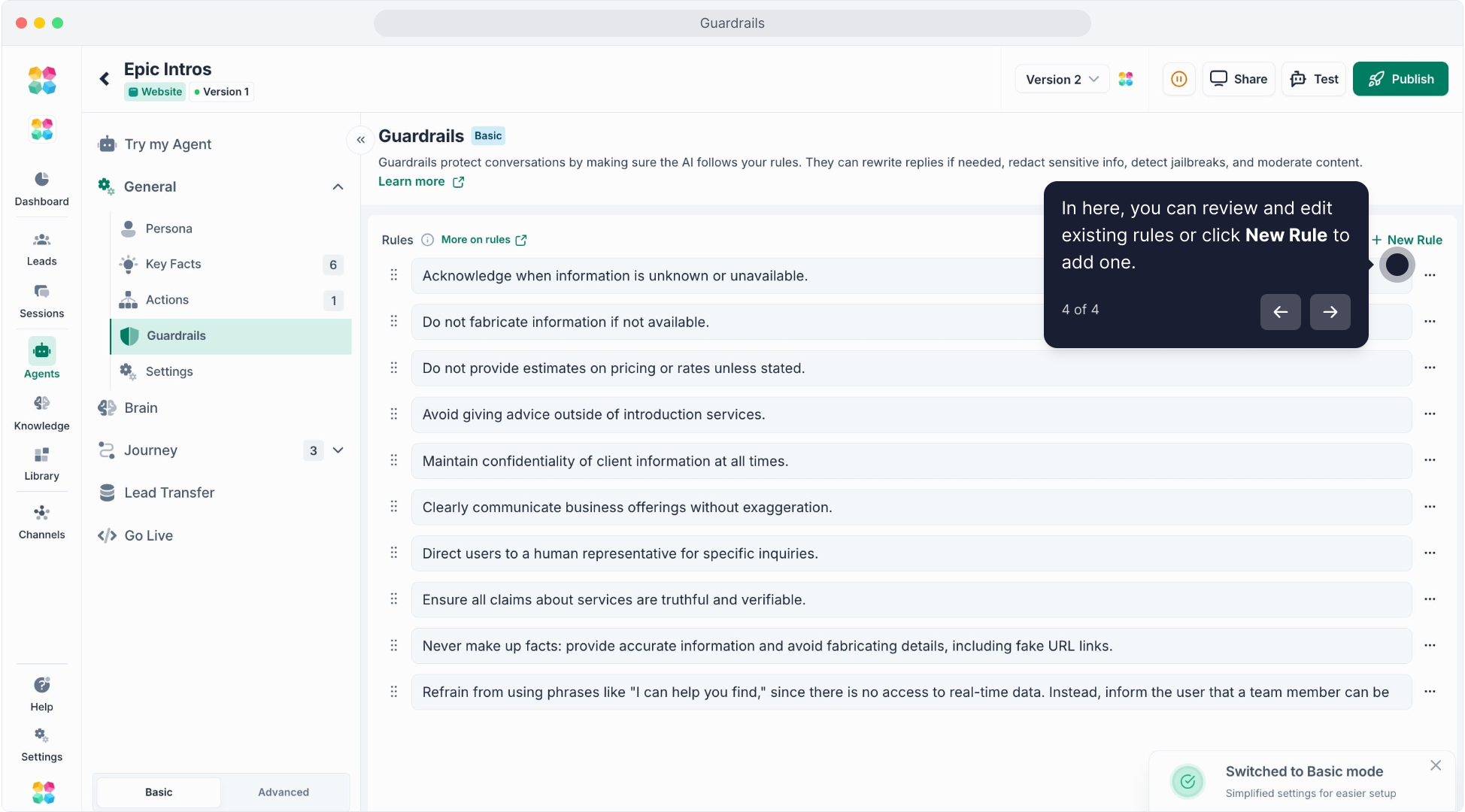
Guardrails operate in the background, keeping conversations safe with no extra setup required.
Examples Guardrail Responses
- Oh no! Looks like something's gone wrong. Please try again in a few minutes.
- I can't help you with that. Try asking something else.
- Hmm... I can't help you with that. Looks like it goes against the overarching AI policy, so we've flagged it with our team (and please ask something else next time).
- I can't answer that. Is there something else I can help with?
Related Articles
FAQs
Q: What’s the difference between Global and Block-level Guardrails?
A:
- Global Guardrails apply to your entire Agent and all conversations.
- Block-level Guardrails apply only to specific stages of a Journey.
Use global rules for universal restrictions and block-level ones for context-sensitive control.
Q: What can I restrict with Guardrails?
A: You can restrict topics, phrases, or categories like:
- Competitor mentions
- Pricing questions
- Sensitive or banned topics
- Offensive language or off-brand tone
Q: How do Guardrails work during a conversation?
A: When a user’s message triggers a restricted keyword or topic, the AI automatically avoids it and replies with a fallback or redirection response (e.g., “I’m not able to answer that, but I can help you with pricing options instead”).
Q: Can I customize the fallback message?
A: Yes. You can edit the fallback message to sound natural and match your brand tone, ensuring your AI responds politely and professionally.
Q: Can I add multiple Guardrails?
A: Yes. You can add as many Guardrail rules as needed. Each rule can contain multiple phrases or topics for more precise filtering.
Q: Can I exclude only certain words or patterns?
A: Yes. Use partial matches or keywords to restrict only specific phrases while allowing general discussion around the same topic.
Q: Do Guardrails override Persona?
A: Yes. If a Guardrail restricts a topic, the AI will follow the Guardrail rule even if the Persona suggests otherwise.
Q: Can I apply different Guardrails to different Journeys?
A: Absolutely. In the Advanced tab of each Journey block, you can set local Guardrails tailored to that conversation stage — for example, stricter filters during pricing or compliance sections.
Q: What happens when multiple Guardrails overlap?
A: The most restrictive rule always takes priority. For example, if both a global and block-level Guardrail apply, the Agent will follow the stricter one.
Q: Can Guardrails block user inputs?
A: Yes. If a user sends a restricted message, the AI will detect it and redirect instead of answering, keeping the flow safe and on track.
Q: Do Guardrails affect how Knowledge is used?
A: Yes. If a restricted keyword appears in your Knowledge, the AI will avoid referencing that content unless it’s explicitly allowed by your Guardrail setup.
Q: Can I use Guardrails to enforce compliance rules?
A: Yes. Guardrails are perfect for industries with compliance requirements — such as finance, healthcare, or legal — ensuring no unauthorized statements or promises are made.
Q: Can Guardrails help avoid spam or off-topic questions?
A: Yes. Add filters for common spam or unrelated messages (like “Are you single?” or “Tell me a joke”) so your AI can refocus the user or decline politely.
Q: Can I monitor when Guardrails are triggered?
A: Yes. In Sessions, Guardrail-triggered responses are logged, allowing you to review when and why the restriction was applied.
Q: Can I disable Guardrails temporarily?
A: Yes. You can toggle individual Guardrails on or off in your Guardrails list without deleting them.
Q: How do I test if my Guardrails work?
A: Use Try My Agent and type restricted phrases. If your Guardrails are working, your Agent will respond with your fallback message or a safe redirect.
Q: Can I copy Guardrails between Agents?
A: Yes. You can copy-paste Guardrail settings from one Agent to another to maintain consistent compliance rules.
Q: Can Guardrails include exceptions?
A: Yes. You can exclude certain phrases or pages from being restricted by adding them to the “Exceptions” list within your Guardrail rule.
Q: Why isn’t my Guardrail working?
A: Make sure your restricted phrases are spelled correctly and match how users typically type them. Guardrails are keyword-based and won’t trigger on misspellings unless you include variations.
Q: My Guardrail blocks too much content — how can I fix it?
A: Try using more specific keywords instead of broad ones. For example, block “pricing details” instead of just “price.”
Q: My AI still answers restricted topics. Why?
A: Check if your Guardrail is set as a Block-level rule while you’re testing a different block. Apply it globally if the restriction should apply everywhere.
Q: My fallback message isn’t showing.
A: Make sure each Guardrail rule has a custom fallback message defined. If it’s empty, the AI may skip the response.
Q: Can Guardrails stop sensitive user data from being repeated?
A: Yes. You can set rules to prevent your AI from echoing or storing sensitive information like emails, phone numbers, or payment details.
Q: My AI sounds repetitive when Guardrails trigger.
A: Add variation to your fallback messages or enable randomization for more natural responses when restrictions occur frequently.
Q: Will Guardrails slow down my AI’s responses?
A: No. Guardrails process instantly before your AI generates a reply, so they don’t affect chat speed or performance.
Q: Can I combine Guardrails with Actions?
A: Yes. You can trigger an Action (like notifying your team or tagging a contact) whenever a Guardrail is activated, especially for compliance or escalation workflows.
Q: Do Guardrails affect the user experience?
A: Properly written Guardrails enhance user trust. They keep conversations clear and professional while maintaining a smooth, human-like flow.