
Collections
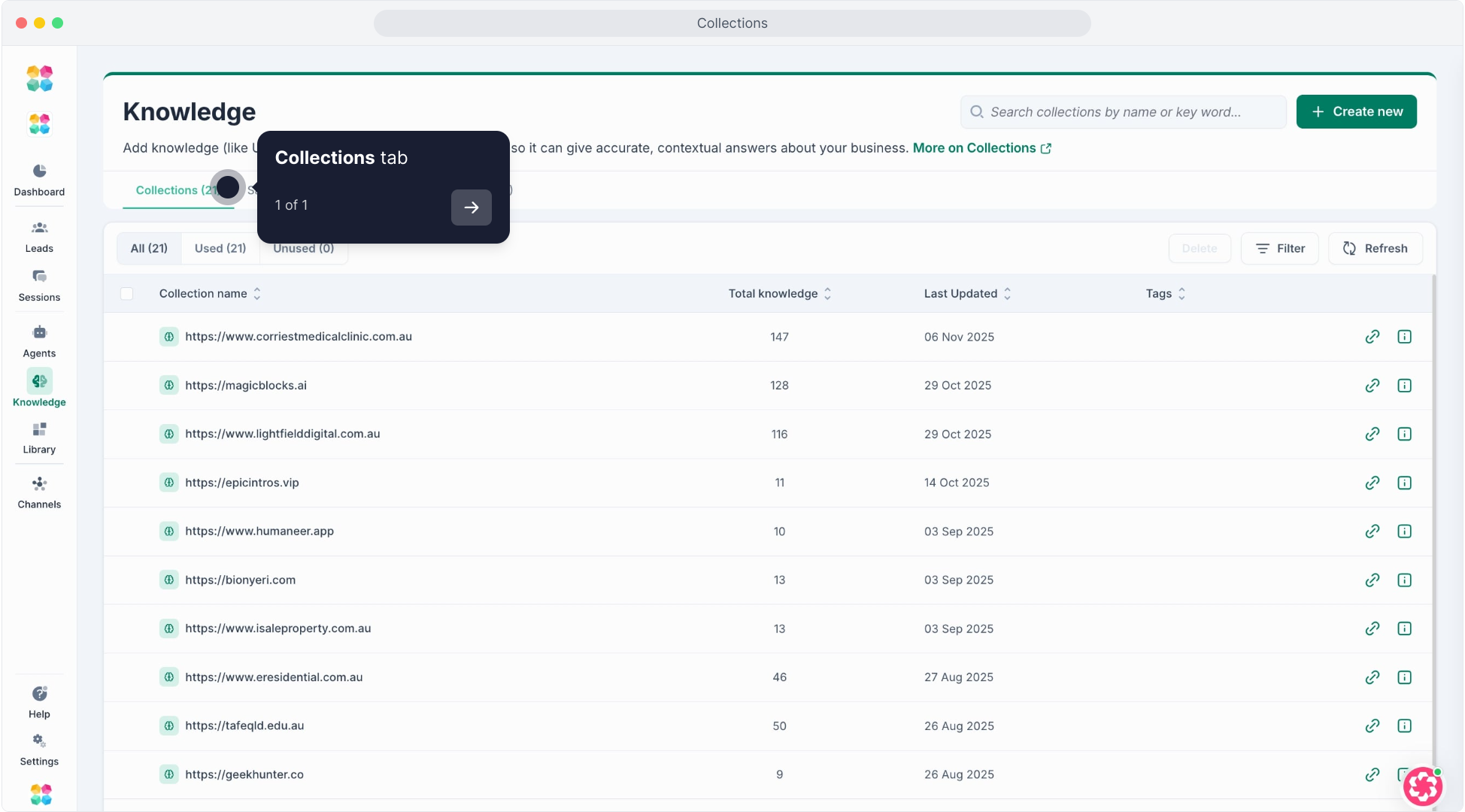
Collections are where all your AI Agent’s knowledge lives.
Each Collection is like a library of information — containing the articles, files, URLs, or Q&As your Agent uses to answer questions and give accurate, contextual responses.
The more organized your Collections are, the smarter and more consistent your AI becomes across every conversation.
What You’ll Find Inside
Here’s what you can do on the Collections page:
View All Collections
See every knowledge source in one place.
All: Shows all available Collections in your workspace.
Used: Collections currently linked to one or more Agents.
Unused: Collections not yet assigned — perfect for cleanup or review.
Collection Table Columns
Collection Name → The title or source (e.g., website URL, PDF name, or topic).
Total Knowledge → Number of knowledge items inside the collection.
Last Updated → When it was last modified or synced.
Tags → Use tags to categorize by product, client, or campaign.
Actions →
- Link icon: Opens the collection details.
- Trash icon: Deletes the collection permanently.
Search & Filter
Use the search bar to quickly find a collection by name or keyword.
Apply filters to show only tagged or untagged collections, or sort by usage.
Create New Collection
Click + Create New in the top right corner to add a fresh knowledge collection.
Choose what kind of knowledge you want to upload:
Website: Crawl URLs or sitemaps.
Article: Write or paste text directly.
Files: Upload PDFs, Docs, CSVs, or Google Drive.
Q&A: Add structured questions and answers.
Refresh Knowledge
Keep your website data current.
Click Refresh on any crawled URL collection to sync new or updated content from your site.
Delete or Clean Up
Select multiple collections using the checkboxes to bulk delete unused or outdated ones.
Why It Matters
Collections keep your AI’s knowledge clean, modular, and reusable.
By managing your knowledge through organized Collections, you can:
- Keep Agents focused only on relevant data
- Avoid duplication across projects or clients
- Easily update shared knowledge across multiple Agents
- Improve Agent accuracy with up-to-date and structured info
- Well-organized Collections mean fewer wrong answers, faster updates, and smarter conversations.
Pro Tips
- Use clear, descriptive names (e.g., Pricing FAQs, Mortgage Docs, Product Features).
- Tag Collections by topic, client, or campaign for quick filtering.
- Regularly check the Unused tab to clean up old or inactive content.
- Sync web-based Collections weekly to ensure accuracy.