
Persona
Your Persona defines how your AI Agent speaks — its voice, tone, and attitude.
Inside each Agent, the Persona ensures every message sounds consistent with your brand personality and business goals.
This is where you bring your AI to life.
Create or Edit a Persona
Open your Agent → Go to General → Persona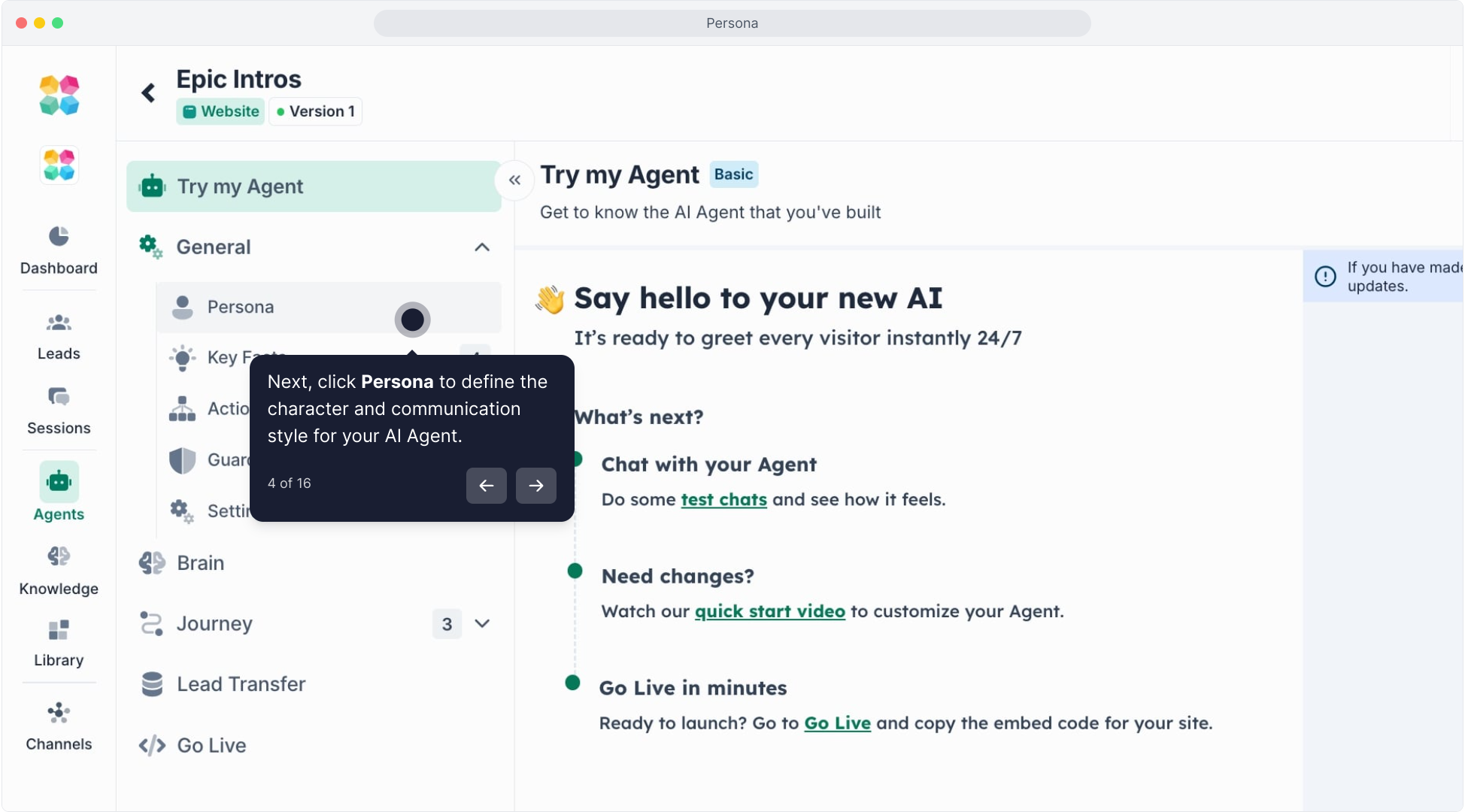
Choose to:
- Create manually — write your Persona from scratch.
- Use Quick Agent Wizard — auto-generate a Persona based on your business type and industry.
Click here to watch the tutorial video:
Set Your Agent’s Identity
- Name & Role: Who your Agent is (e.g., “Sophie – your AI Sales Assistant”)
- Purpose: What your Agent helps users achieve (e.g., “Convert visitors into qualified contacts.”)
- Define the Voice & Tone
Choose how your AI sounds: friendly, expert, direct, playful, or formal.
You can describe it in simple terms (e.g., “Energetic, persuasive, and supportive”).
Add Personality Prompts
Use natural language prompts to shape how your AI behaves and speaks.
Example:
“You are friendly, knowledgeable, and always focused on helping users find the right plan.”
Click here to watch the full tutorial:
Preview in Try My Agent
Click Try My Agent to chat instantly and test your Persona’s voice.
Refine tone, phrasing, and empathy based on how it feels in real conversation.
Why It Matters
Your Persona is what makes your Agent feel alive — it turns automated replies into human conversations.
A strong Persona helps you:
- Stay consistent across every channel (web, chat, SMS)
- Reflect your brand voice authentically
- Build user trust through tone and empathy
Pro Tips
- Give your Persona a name and a purpose
- Keep tone consistent with your audience (e.g., friendly for B2C, expert for B2B)
- Use short, clear instructions for tone and behavior
- Test and refine in “Try My Agent” often
Related Articles
Core Concepts: Persona Explained
FAQs:
Q: Why is Persona important?
A: Persona makes your AI Agent sound natural and aligned with your brand voice. It ensures that your Agent’s tone — whether friendly, professional, or persuasive — matches your customer experience goals.
Q: Where can I set up my Agent’s Persona?
A: Go to General → Persona in your MagicBlocks workspace. From there, you can define your AI’s style, role, and communication rules.
Q: What should I include in my Persona setup?
A: Include your Agent’s tone, behavior guidelines, writing style, and point of view. Example:
“Friendly, empathetic sales advisor who speaks confidently about pricing and product benefits.”
Q: Can I change my Persona after creating an Agent?
A: Yes. You can edit or update your Persona anytime from the General Settings → Persona page. The changes take effect instantly across all conversations.
Q: Can I have different Personas for different Agents?
A: Absolutely. Each Agent can have its own Persona to reflect its unique purpose — for example, one for sales, another for support, and one for contact qualification.
Q: Can I customize Persona per conversation block?
A: Yes. In the Journey → Advanced tab, you can override the global Persona and apply a custom one for a specific block (like “Reassuring Assistant” or “Confident Closer”).
Q: What’s the difference between Persona and Tone?
A: Persona is your AI’s identity — who it is. Tone is how it expresses that identity in each situation. Persona remains constant, while tone can adapt per block or context.
Q: Can my Persona use emojis or humor?
A: Yes. You can instruct your Persona to use emojis, humor, or specific phrases — just make sure it fits your brand and target audience.
Q: How does Persona interact with Knowledge?
A: Persona defines how your Agent speaks, while Knowledge defines what it says. Together, they ensure your AI gives accurate and brand-aligned answers.
Q: What’s the best way to write a strong Persona?
A: Keep it specific, short, and focused. Define your AI’s tone (friendly, expert, casual), goal (inform, sell, assist), and boundaries (avoid slang, stay polite).
Q: Can I preview my Persona’s behavior?
A: Yes. After updating your Persona, use Try My Agent to chat with your AI and see how it sounds with the new style.
Q: Can I duplicate a Persona for another Agent?
A: Yes. Copy your Persona settings and paste them into another Agent’s Persona editor for consistency across multiple AI Agents.
Q: Does changing Persona affect my existing Journeys?
A: It can. Global Persona changes will influence your Agent’s overall tone in every Journey unless a block has a custom Persona override.
Q: Can I reset my Persona to default?
A: Yes. Click Reset Persona in the Persona settings to revert to MagicBlocks’ default friendly and neutral tone.
Q: Can I upload or import a Persona?
A: Currently, Personas are text-based only, but you can copy your Persona script from another Agent or document to reuse it.
Q: Can Persona be trained using examples?
A: Yes. You can write example dialogues in the Persona setup to help your Agent mimic your preferred tone and phrasing style.
Q: How many Personas can I create?
A: There’s no strict limit. You can create one per Agent or multiple versions for experimentation.
Q: How does Persona affect user trust?
A: A consistent Persona builds credibility, empathy, and clarity — making your AI feel more trustworthy and natural to talk to.
Q: Can I test multiple Personas for performance?
A: Yes. Clone your Agent, assign different Personas, and run A/B tests to compare user engagement or conversion results.
Q: Why does my AI sound robotic or off-tone?
A: Check if your Persona instructions are too short or generic. Add details about tone, emotion, and behavior to make it sound more authentic.
Q: My Persona isn’t applying in some blocks. Why?
A: Verify that the block doesn’t have a local Persona override in the Advanced tab. Local settings take priority over global ones.
Q: My Agent suddenly sounds different. What happened?
A: Someone might have updated the Persona or added a Journey-level override. Check the latest settings under General → Persona and Journey → Advanced.
Q: My Persona ignores certain instructions.
A: Avoid conflicting directions (e.g., “be humorous” and “be serious”). Keep your Persona script clear and cohesive so the AI can follow it effectively.
Q: The tone doesn’t match my brand voice.
A: Refine your Persona description. Add clear traits like “professional but approachable” or “warm and confident.” Then test in Try My Agent.
Q: Can I set the language or formality level in Persona?
A: Yes. Specify if your AI should sound formal, casual, or bilingual (e.g., English–Spain). MagicBlocks supports multilingual Personas.
Q: My Agent’s responses are inconsistent across Journeys.
A: Ensure all Journeys use the same Persona or tone settings. If some have overrides, align them manually for consistency.
Q: I changed Persona, but nothing changed in chat.
A: Try refreshing your browser and re-testing in Try My Agent. Cached versions can delay updates.
Q: My AI uses words or phrasing I didn’t include.
A: The AI sometimes rephrases using its model logic. If it strays too far, add stricter guidelines in your Persona script to anchor tone and phrasing.
Q: My Agent doesn’t follow role instructions (e.g., “act like a sales coach”).
A: Rephrase your Persona introduction clearly, e.g., “You are a friendly sales coach who helps users find the right plan confidently and positively.”
Q: Can Persona help with compliance or restricted topics?
A: Yes. You can set rules in the Persona to restrict certain answers or redirect to safer responses for compliance-sensitive industries.
Q: Does Persona affect Actions or logic?
A: No. Persona only affects communication style. Logic, triggers, and workflows are controlled separately under Journey → Actions.